
PYKL3 Radar (USA NEXRAD/TDWR)2.9.1.5.0 - Google Play
You'll be able to see results in few seconds.
Publisher Description
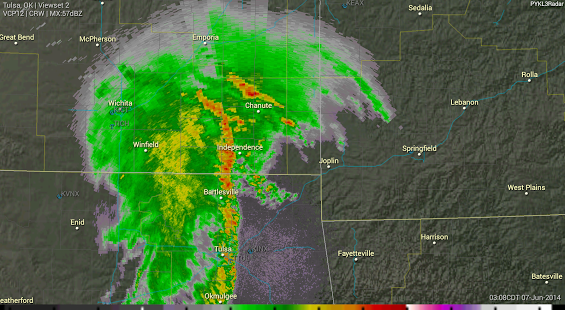
Why settle for smoothed images of low resolution radar that claim to be high resolution when you can have the REAL data as delivered from National Weather Service radars? Smoothed "street level" "high resolution" radar is a visualization gimmick which compromises data quality. The data that NWS radar generates appears pixelated to inexperienced users, but there is a reason it looks that way - accuracy! This is what PYKL3Radar provides--the most accurate dataset available. If you want professional grade information instead of pretty pictures, you have come to the right place! Combine that with its unmatched customization with 40+ data layers, PYKL3Radar holds its place as the highest rated radar viewer for Android since its introduction in 2010
PYKL3 Radar (pronounced Pickle Radar) was the first level 3 radar viewer for Android. It remains the most advanced, yet simple to use application for United States radar information. PYKL3Radar is intended for users who want more out of a weather radar viewer...much more! PYKL3Radar also gives you surface observation plots (ground truth), satellite imagery, and virtually every National Weather Service text product wrapped with a highly customizable experience. Designed with first responders, spotters, emergency management officials, and chasers in mind, PYKL3 continues to push the limits of what is possible on Android by embracing the ideas of a very active user community. PYKL3 is the only Android viewer with customizable colors, including the radar color table. What's more, your location is constantly displayed right on top of the radar imagery. PYKL3 Radar is the application for having the critical weather data you need.
Radar data from every operational National Weather Service WSR-88D and FAA Terminal Doppler Weather Radar (TDWR) site is delivered to your phone with products ranging from standard reflectivity to the newest dual-pol variables. Need more? Pull up the latest satellite imagery or warning products with the touch of your screen. With an optional subscription to AllisonHouse.com or CaprockWeather.com, add the display of graphical severe weather outlooks, convective watch boxes, local storm reports, storm tracks, and lightning.
Supported by a fantastic user community, PYKL3 Radar is brought to you by a developer with a passion for weather for serious users of radar data.
We know Google Play only gives you 15 minutes to evaluate a program before a purchase. That's not nearly enough time to explore the many features and options of PYKL3Radar. So, purchase in confidence! If it does not meet your expectations, just write us back within 24 hours of your purchase and we'll get you refunded.
If you have any issues with the program, please contact support@pykl3radar.com We are here to help!
PLEASE ENSURE A SOLID, FAST INTERNET CONNECTION WHEN RUNNING THE FIRST TIME as about 10MB of support files are acquired. If you run into issues, please contact us. We can help!
Product page and manual: http://www.pykl3radar.com
Facebook: http://www.facebook.com/PYKL3Radar
Twitter: https://twitter.com/pykl3radar
Product support: support@pykl3radar.com
About PYKL3 Radar (USA NEXRAD/TDWR)
The company that develops PYKL3 Radar (USA NEXRAD/TDWR) is PYK Consulting. The latest version released by its developer is 2.9.1.5.0.
To install PYKL3 Radar (USA NEXRAD/TDWR) on your Android device, just click the green Continue To App button above to start the installation process. The app is listed on our website since 2018-02-20 and was downloaded 0 times. We have already checked if the download link is safe, however for your own protection we recommend that you scan the downloaded app with your antivirus. Your antivirus may detect the PYKL3 Radar (USA NEXRAD/TDWR) as malware if the download link to com.MyPYK.Radar.Full is broken.
How to install PYKL3 Radar (USA NEXRAD/TDWR) on your Android device:
- Click on the Continue To App button on our website. This will redirect you to Google Play.
- Once the PYKL3 Radar (USA NEXRAD/TDWR) is shown in the Google Play listing of your Android device, you can start its download and installation. Tap on the Install button located below the search bar and to the right of the app icon.
- A pop-up window with the permissions required by PYKL3 Radar (USA NEXRAD/TDWR) will be shown. Click on Accept to continue the process.
- PYKL3 Radar (USA NEXRAD/TDWR) will be downloaded onto your device, displaying a progress. Once the download completes, the installation will start and you'll get a notification after the installation is finished.
Program Details
System requirements
Download information
Pricing
Version History
version 2.9.1.5.0
posted on 2018-02-20
Refinements/Enhancement to RADAR selection popup
RADAR map stays fixed when selecting from list of closest radars
Minor bugfixes
version 2.9.0.4
posted on 2016-07-20
Version 2.9,Update for NWS infrastructure changes (2.9.0.4),Product release notes are available at:,https://docs.google.com/document/d/1lvOPPUNiMRkuFAi-8zICcjTnHzJPyaPwHlG3gRiwjt0,Product support is available from support@pykl3radar.com
version 2.01
posted on 2011-05-07
Several fixes and updates
Disclaimer
Official Google Play Link
We do not host PYKL3 Radar (USA NEXRAD/TDWR) on our servers. We did not scan it for viruses, adware, spyware or other type of malware. This app is hosted by Google and passed their terms and conditions to be listed there. We recommend caution when installing it.
The Google Play link for PYKL3 Radar (USA NEXRAD/TDWR) is provided to you by apps112.com without any warranties, representations or guarantees of any kind, so access it at your own risk.
If you have questions regarding this particular app contact the publisher directly. For questions about the functionalities of apps112.com contact us.
